

Planning Your 2027 IT Budget: A Practical Guide for Orange County Businesses
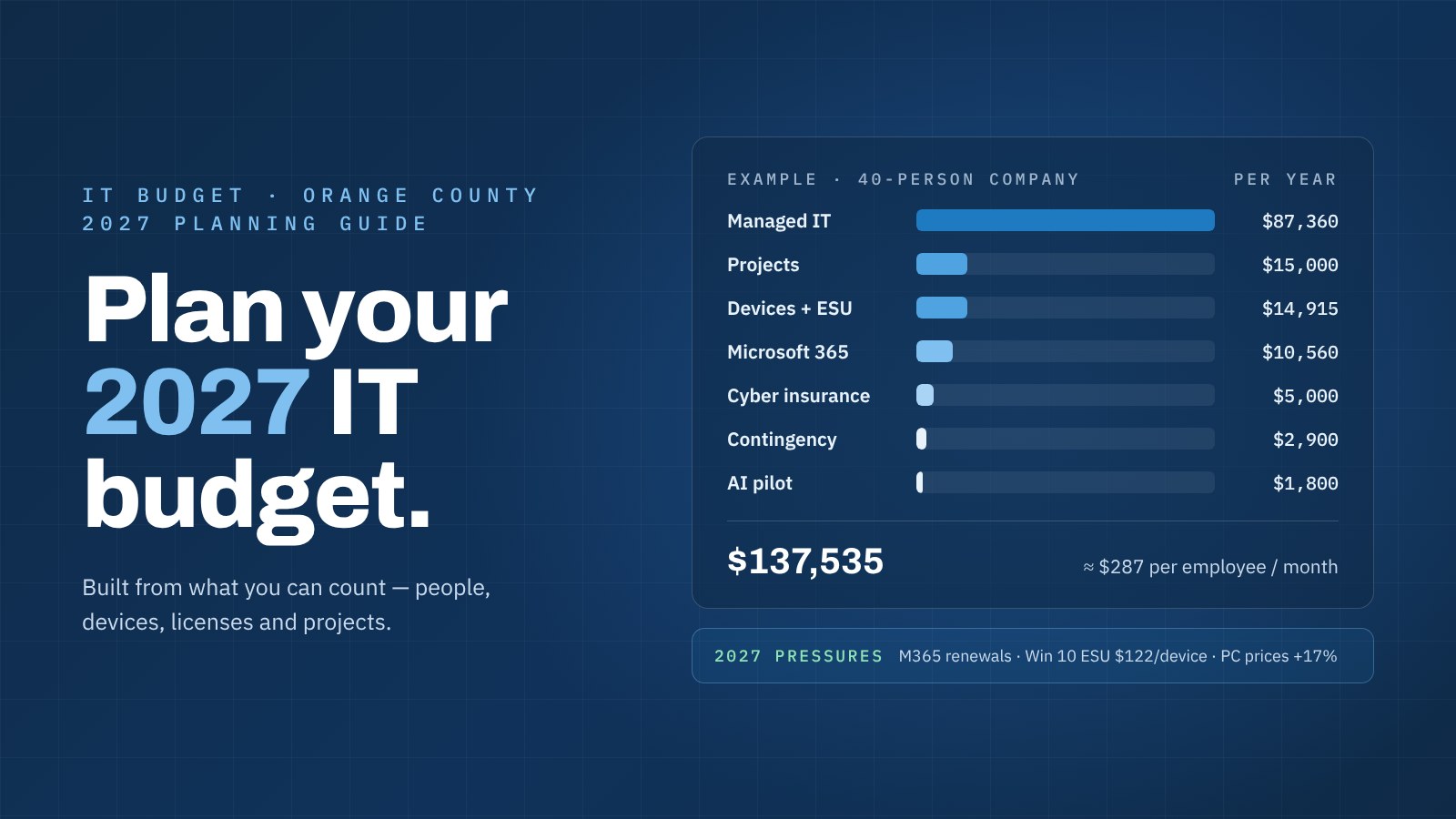
Most IT budgets go wrong in one of two ways: they copy last year’s numbers forward, or they start from a percentage of revenue that has nothing to do with how the business actually runs. A better budget is built from things you can count — people, devices, licenses, projects — and then adjusted for what’s changing next year. Here’s how to do that for 2027, written for owners, CFOs and operations managers at Orange County businesses with 15 to 250 employees.
Updated October 28, 2026. Prices and programs below are as published in late October 2026. Check vendor pricing again before you sign anything, and we’ll update this page if something material changes.
Start with what you can count
Before you put a dollar figure anywhere, build three short lists. They take an afternoon and make every other line of the budget easier:
- People. Today’s headcount and where you expect to be by the end of 2027, including seasonal staff and anyone who shares a computer on the shop floor or in the warehouse.
- Devices. Every laptop, desktop and server, with its age and operating system. Note anything still on Windows 10.
- Subscriptions and contracts. Microsoft 365, your ERP or line-of-business software, phone system, internet circuits, cyber insurance and any IT support agreement — with renewal dates.
Renewal dates matter more than most people expect. A price increase announced this year often doesn’t reach you until your annual term renews, which is how a lot of 2026 changes will land in the 2027 budget.
The budget lines, one at a time
1. Run costs: support and security per user
Your biggest recurring line is usually the cost of keeping people productive and protected: help desk, monitoring, patching, backup and the security tools that sit on every device. With managed IT, this is mostly headcount times a per-user price, so it scales with hiring instead of surprising you.
When you compare quotes, check what the per-user price actually covers. Ask whether computers and mailboxes are included or billed per device, whether security tools like endpoint detection and response and 24×7 monitoring are part of the price, and whether on-site visits, onboarding and new-computer setups are extra. For reference, CAL IT Group’s published Managed Care price is $179 per user per month for the first 100 users and $149 for each additional user, with a $4,000 monthly minimum and no onboarding fee. Each user includes one workstation and one mailbox; additional workstations or servers are $40 a month each. You can run your own headcount through the pricing calculator in about a minute.
If you’re weighing an internal hire instead, remember that salary isn’t the whole cost. The Bureau of Labor Statistics reports that benefits made up 30% of private-industry compensation costs in June 2026, and total compensation costs rose 3.3% over the year ended June 2026. Our in-house vs. managed IT cost calculator puts the two side by side.
2. Microsoft 365 licensing
Licensing is usually billed separately from support, so give it its own line. Microsoft’s list price changes took effect on July 1, 2026. As The Register reported, Business Basic went from $6 to $7 per user per month, Business Standard from $12.50 to $14, and Business Premium stayed at $22. Frontline plans rose too: F1 from $2.25 to $3 and F3 from $8 to $10.
Two practical points. First, if you’re on Business Standard and also paying for separate security add-ons, compare the total against Business Premium — the gap narrowed this year. Second, count licenses against your people list. Accounts for former employees and duplicate subscriptions are some of the easiest savings in any budget.
3. Devices and the refresh cycle
Don’t budget computers as a surprise expense. Put every device on a replacement cycle — typically four to five years for laptops and desktops — and replace roughly that fraction of your fleet each year so the cost is steady.
Plan for higher prices in 2027. In February 2026, Gartner projected PC prices would rise 17% by the end of 2026 as memory and storage costs surged, and expected business buyers to keep devices about 15% longer. Computerworld also pointed to component tariffs and leaner entry-level configurations. Keeping devices longer is reasonable; buying underpowered ones to hit a price usually isn’t, because they slow people down for the next five years.
4. Security tools and testing
List each security control and who pays for it: endpoint detection and response, email security, multi-factor authentication, backup, security awareness training, vulnerability scanning and 24×7 monitoring. Many of these are included in a good managed IT agreement; others aren’t. At CAL IT Group, for example, the core security stack is part of Managed Care, while a password manager, application allowlisting, AI security and governance tools and an annual network penetration test are available at additional cost. Whatever provider you use, make sure each tool appears exactly once in the budget — not zero times, not twice.
5. Cyber insurance
Put your premium in the IT budget, or at least next to it, because your security controls drive what you pay and whether you’re covered at all. The market has been calmer: Insurance Business reported in September 2026 that U.S. cyber rates fell another 2% in the second quarter, even as insurers’ loss ratios rose. Underwriters are now asking about how companies use AI and depend on outside vendors, on top of the long-standing questions about MFA, backups and endpoint protection. Run our cyber insurance readiness check before your renewal so any gaps go into the budget, not into a denied claim.
6. Compliance projects
If a customer, prime contractor or regulator expects you to meet a standard — CMMC and NIST SP 800-171 for defense suppliers, SOC 2 for companies that host customer data — budget the work separately: scoping, gap assessment, fixes and documentation. These are projects with a start and an end, and they belong in the next section.
Separate projects from run costs
Run costs are what it takes to operate the business you have. Projects change it: a server replacement, a move to the cloud, a new office, a firewall upgrade, an ERP update. Keep them on separate lines so a one-time project doesn’t inflate your baseline next year, and so you can delay a project without cutting support.
For each project, write down the business reason, a target quarter and a fixed price. Ask for written, fixed-fee quotes rather than hourly estimates — that’s how CAL IT Group quotes projects, and it’s a fair thing to ask of any provider. A technology roadmap from your IT partner should already list most of these.
What’s different about 2027
- Windows 10 is costing more to keep. Free support ended in October 2025. Microsoft sells Extended Security Updates to businesses at $61 per device for Year One, and the price doubles each year — $122 per device for Year Two. Because ESUs are cumulative, joining late means paying for the year you missed. For most companies, replacing the machine is the better use of that money.
- Microsoft 365 renewals at the new prices. If your annual term renewed before July 1, 2026, the increase arrives at your next renewal.
- Higher hardware prices and longer lifecycles. Budget for higher unit costs and stretch the cycle sensibly.
- AI. Microsoft 365 Copilot runs about $30 per user per month on top of your Microsoft 365 license. Rather than licensing everyone, fund a small pilot with a few heavy users, plus the policy and data clean-up that should come first. Our AI readiness assessment covers that groundwork.
- Labor costs. With compensation costs up 3.3% in a year, the cost of downtime rises with them. Our downtime cost calculator shows what an hour offline costs your team.
A worked example: a 40-person company
Here’s a simple 2027 budget for a 40-person Orange County manufacturer or distributor: 40 users with one computer and mailbox each, two extra shop-floor PCs and one server, on Microsoft 365 Business Premium. CAL IT Group and Microsoft figures are published prices; everything marked “assumption” is an example you should replace with your own quotes.
| Budget line | 2027 estimate |
|---|---|
| Managed IT: 40 users × $179 × 12 | $85,920 |
| Extra devices: 2 PCs + 1 server × $40 × 12 | $1,440 |
| Microsoft 365 Business Premium: 40 × $22 × 12 | $10,560 |
| Laptop refresh: 10 × $1,400 (assumption) | $14,000 |
| Windows 10 ESU: 5 PCs that can’t be replaced yet × ($61 + $122) | $915 |
| Copilot pilot: 5 users × about $30 × 12 | $1,800 |
| Cyber insurance premium (assumption — get it from your broker) | $5,000 |
| Projects: firewall and server upgrade, fixed fee (assumption) | $15,000 |
| Contingency: 10% of hardware and projects | $2,900 |
| Total | $137,535 about $3,440 per employee a year ($287 a month) |
Notice how the budget behaves. More than 70% of it is predictable run cost that moves only with headcount. The parts that can swing — hardware, projects and insurance — are listed separately with a contingency on top, so a CFO can see exactly where the risk sits and what can be deferred if the year turns tight.
Your 2027 IT budget checklist
- Count people, devices and subscriptions, with renewal dates.
- Price support and security per user, and confirm what the per-user price includes.
- Re-price Microsoft 365 at the July 2026 list prices and remove unused licenses.
- Put every computer on a replacement cycle and budget this year’s share at 2027 prices.
- Replace or fund every Windows 10 machine — and set a date for each one.
- List every security tool once, with who provides it and what it costs.
- Bring cyber insurance into the budget and check readiness before renewal.
- Separate projects from run costs, each with a reason, a quarter and a fixed price.
- Fund a small, governed AI pilot instead of licensing everyone at once.
- Add a contingency on the lines that can swing — 10% is a sensible start.
How CAL IT Group helps
Over 40% of our clients are manufacturers and distributors, and budgeting is part of the job, not an extra. Managed Care includes vCIO services, workstation lifecycle planning and a multi-year technology roadmap, so your projects and replacements are planned before they become emergencies. Our pricing is published, projects are quoted as a fixed fee in writing before work starts, and supporting your existing environment is never billed as extra time. See our managed IT pricing guide for all-in monthly totals at different team sizes, or learn more about our work with manufacturers and distributors.
Calculate your managed IT cost Plan your 2027 budget with us
Sources: Microsoft 365 blog (December 4, 2025); The Register (December 5, 2025); Microsoft Learn, Windows 10 Extended Security Updates; The Register (February 5, 2025); Gartner press release (February 26, 2026); Computerworld (January 27, 2026); Insurance Business (September 17, 2026); U.S. Bureau of Labor Statistics, Employer Costs for Employee Compensation (September 9, 2026) and The Economics Daily (August 5, 2026). Prices are list prices in U.S. dollars; your costs may differ.